
How to use Katanox: property owners
We built Katanox to streamline & simplify every hospitality payment. With this solution, hotels receive faster, guaranteed payouts and cleaner settlement data.
This guide
- Is tailored for: admins and owners of hotel properties
- Covers: how to set up your Katanox workspace, and make the most of Katanox's features
Setting up your account
Create an account
- Sign up at the Katanox Finance Workspace using your work email (recommended)
- Create a company account for your business
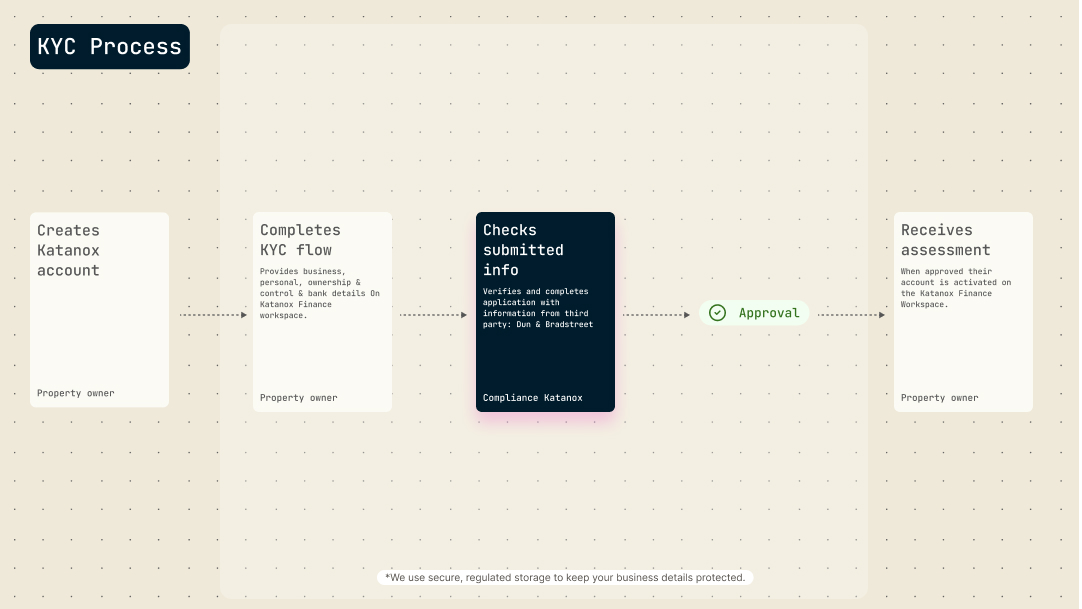
Go through KYC
Katanox is required under our financial license obligations to get to know, assess and approve you as our customer, including your legal entity and affiliated natural person information through the Know Your Customer (KYC) process.
Organizing your team
Invite your team members directly in the platform and scale operations safely. You can assign roles and manage access levels under Settings → Team Management, so the right people can manage payouts, bank details, and reporting.
Receiving payments
Katanox transfers payments on the day of materialization, at booking for prepaid/non-refundable policies or at check-in for flexible policies. As an owner you'll have direct access to these funds without additional PSP charges. Full visibility into payment status can be found on the Katanox platform, supplemented by email confirmations to provide front-desk and finance teams with confidence without requiring a login.
Reviewing reports
As an admin of your company account, you'll receive the following reports in your email for your reconciliation process;
- Bookings report: matches bookings with payouts
- Transaction report: reconcile payouts received in your bank account with processed transactions.
All commissions and fees are managed through Katanox Accounting, and properties will receive the net payment, with reports specifying all components.
Support
If you're having issues while onboarding or have any other questions, you can reach out to us through:
- Phone: +1-(XXX)-XXX-XXXX (Mon - Fri, 9:00 - 17:00 CET/CEST | Amsterdam business hours)
- Email: [email protected]